Never Lose Sleep Over a Client Changing Their Mind Again.
Turn verbal approvals into legally binding, IP-locked documents. Get your quotes, renders, and plans signed off in seconds, before a single board is cut.
Start Sending Documents for Free
Add QCR to your website or app!
Add QCR to your website or app!

Never Lose Sleep Over a Client Changing Their Mind Again.
Turn verbal approvals into legally binding, IP-locked documents. Get your quotes, renders, and plans signed off in seconds, before a single board is cut.
Start Sending Documents for Free
Add QCR to your website or app!
Add QCR to your website or app!
Never Lose Sleep Over a Client Changing Their Mind Again.
Turn verbal approvals into legally binding, IP-locked documents. Get your quotes, renders, and plans signed off in seconds, before a single board is cut.
Start Sending Documents for Free
Add QCR to your website or app!
Add QCR to your website or app!
The "I Didn't Say That" Shield
Stop relying on messy email chains and text messages. When a client signs in CabSign, the exact PDF, timestamp, and their IP address are locked into a certified receipt. If they try to change their mind on the benchtop color after the stone is cut, you have the proof.
Zero-Friction for the Homeowner
No apps to download. No accounts to create. You text or email them a secure link, they open it on their phone, review the plans, and sign with their finger in 15 seconds.
The Perfect QuickCabRender Companion
You used QuickCabRender to win the job. Now use CabSign to lock it in. Upload your final renders alongside your technical plans so the client signs off on exactly what the kitchen will look like.
The "I Didn't Say That" Shield
Stop relying on messy email chains and text messages. When a client signs in CabSign, the exact PDF, timestamp, and their IP address are locked into a certified receipt. If they try to change their mind on the benchtop color after the stone is cut, you have the proof.
Zero-Friction for the Homeowner
No apps to download. No accounts to create. You text or email them a secure link, they open it on their phone, review the plans, and sign with their finger in 15 seconds.
The Perfect QuickCabRender Companion
You used QuickCabRender to win the job. Now use CabSign to lock it in. Upload your final renders alongside your technical plans so the client signs off on exactly what the kitchen will look like.
The "I Didn't Say That" Shield
Stop relying on messy email chains and text messages. When a client signs in CabSign, the exact PDF, timestamp, and their IP address are locked into a certified receipt. If they try to change their mind on the benchtop color after the stone is cut, you have the proof.
Zero-Friction for the Homeowner
No apps to download. No accounts to create. You text or email them a secure link, they open it on their phone, review the plans, and sign with their finger in 15 seconds.
The Perfect QuickCabRender Companion
You used QuickCabRender to win the job. Now use CabSign to lock it in. Upload your final renders alongside your technical plans so the client signs off on exactly what the kitchen will look like.
Bulletproof Approvals. Zero Excuses.
Bulletproof Approvals. Zero Excuses.

The Digital Fingerprint
The Digital Fingerprint
The Digital Fingerprint
Court-Ready Audit Trails
Court-Ready Audit Trails
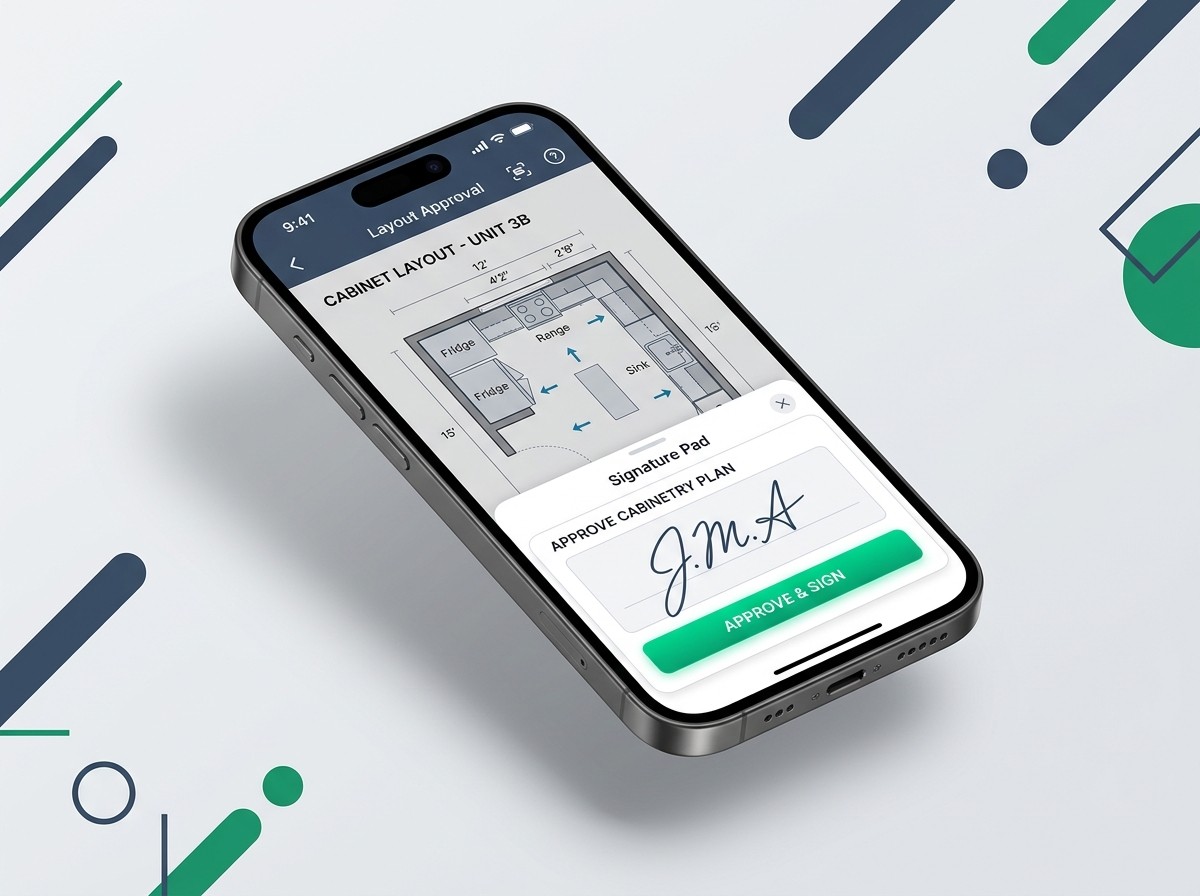
We don't just capture a drawn squiggle. CabSign records the signer’s exact IP address, device type, and a cryptographic timestamp the second they hit approve. If a dispute ever escalates, you have a certified, tamper-proof PDF proving exactly what they saw and when they agreed to it.
We don't just capture a drawn squiggle. CabSign records the signer’s exact IP address, device type, and a cryptographic timestamp the second they hit approve. If a dispute ever escalates, you have a certified, tamper-proof PDF proving exactly what they saw and when they agreed to it.
The "Phone-First" Signing Flow
The "Phone-First" Signing Flow
Get Approvals from the Job Site
Get Approvals from the Job Site
Your clients are busy. If you email them a PDF that they have to print, sign, scan, and email back, it will take weeks. CabSign sends a responsive, mobile-optimized link. They can review your shop drawings and swipe to sign while standing in line for coffee.
Your clients are busy. If you email them a PDF that they have to print, sign, scan, and email back, it will take weeks. CabSign sends a responsive, mobile-optimized link. They can review your shop drawings and swipe to sign while standing in line for coffee.

One Ecosystem
One Ecosystem
One Ecosystem
Powered by CabinetryOS
Powered by CabinetryOS
Stop juggling different passwords for your quoting, rendering, and signing software. CabSign is natively built into the CabinetryOS ecosystem. If you already have a QuickCabRender account, your login works right now.
Stop juggling different passwords for your quoting, rendering, and signing software. CabSign is natively built into the CabinetryOS ecosystem. If you already have a QuickCabRender account, your login works right now.
The cheapest insurance policy your shop will ever buy.
One prevented remake pays for the software for the next ten years. No lock-in contracts.
The cheapest insurance policy your shop will ever buy.
One prevented remake pays for the software for the next ten years. No lock-in contracts.
The cheapest insurance policy your shop will ever buy.
One prevented remake pays for the software for the next ten years. No lock-in contracts.
Essentials
$19
USD / Per month
For smaller shops managing a few active jobs.
20 Document Signatures per month
IP & Timestamp Audit Trail
Certified PDF Receipts
Mobile-Optimized Signing Portal
Professional
$49
USD / Per month
For busy shops that need every quote, variation, and final plan signed off.
100 Document Signatures per month
Everything in Starter, plus:
Custom Company Branding (Your logo on the portal)
Automated Follow-up Reminders
Priority Email Support
Most popular!
Unlimited
$129
USD / Per month
For large manufacturers and multi-designer showrooms.
Unlimited Document Signatures
Everything in Business, plus:
White-Label Sending (Remove CabSign branding)
API Access (coming soon)
Essentials
$19
USD / Per month
For smaller shops managing a few active jobs.
20 Document Signatures per month
IP & Timestamp Audit Trail
Certified PDF Receipts
Mobile-Optimized Signing Portal
Professional
$49
USD / Per month
For busy shops that need every quote, variation, and final plan signed off.
100 Document Signatures per month
Everything in Starter, plus:
Custom Company Branding (Your logo on the portal)
Automated Follow-up Reminders
Priority Email Support
Most popular!
Unlimited
$129
USD / Per month
For large manufacturers and multi-designer showrooms.
Unlimited Document Signatures
Everything in Business, plus:
White-Label Sending (Remove CabSign branding)
API Access (coming soon)
Stop leaving your margins to chance.
💡 The Business Math: It costs $800 to remake a single stone benchtop because of a "misunderstanding" over the plans. For less than a fraction of that cost, CabSign guarantees every single detail is legally locked in and approved before you ever touch a saw.
Frequently Asked Questions
Frequently Asked Questions
Frequently Asked Questions
Are these digital signatures legally binding?
Yes. CabSign complies with standard electronic signature laws (like the ESIGN Act in the US and the eIDAS regulation in the UK/Europe). By capturing the signer's IP address, precise timestamp, and intent to sign, the generated Certified PDF acts as a legally enforceable contract.
Do my clients need to create an account or download an app?
Absolutely not. Friction kills approvals. Your client simply clicks the secure link you send them, reviews the document in their web browser (on any phone, tablet, or computer), and signs with their finger or mouse.
Can I upload QuickCabRender renders alongside my technical plans?
Yes. We highly recommend merging your photorealistic renders (from QuickCabRender) into the same PDF as your 2D shop drawings. When the client signs, they are legally agreeing to both the technical dimensions and the visual finish.
I already have a QuickCabRender account. Do I need to make a new one?
No. CabSign is built on the CabinetryOS platform. You can log into CabSign using your exact same QuickCabRender email and password, and simply upgrade your plan to include signature features.
Are these digital signatures legally binding?
Yes. CabSign complies with standard electronic signature laws (like the ESIGN Act in the US and the eIDAS regulation in the UK/Europe). By capturing the signer's IP address, precise timestamp, and intent to sign, the generated Certified PDF acts as a legally enforceable contract.
Do my clients need to create an account or download an app?
Absolutely not. Friction kills approvals. Your client simply clicks the secure link you send them, reviews the document in their web browser (on any phone, tablet, or computer), and signs with their finger or mouse.
Can I upload QuickCabRender renders alongside my technical plans?
Yes. We highly recommend merging your photorealistic renders (from QuickCabRender) into the same PDF as your 2D shop drawings. When the client signs, they are legally agreeing to both the technical dimensions and the visual finish.
I already have a QuickCabRender account. Do I need to make a new one?
No. CabSign is built on the CabinetryOS platform. You can log into CabSign using your exact same QuickCabRender email and password, and simply upgrade your plan to include signature features.
Are these digital signatures legally binding?
Yes. CabSign complies with standard electronic signature laws (like the ESIGN Act in the US and the eIDAS regulation in the UK/Europe). By capturing the signer's IP address, precise timestamp, and intent to sign, the generated Certified PDF acts as a legally enforceable contract.
Do my clients need to create an account or download an app?
Absolutely not. Friction kills approvals. Your client simply clicks the secure link you send them, reviews the document in their web browser (on any phone, tablet, or computer), and signs with their finger or mouse.
Can I upload QuickCabRender renders alongside my technical plans?
Yes. We highly recommend merging your photorealistic renders (from QuickCabRender) into the same PDF as your 2D shop drawings. When the client signs, they are legally agreeing to both the technical dimensions and the visual finish.
I already have a QuickCabRender account. Do I need to make a new one?
No. CabSign is built on the CabinetryOS platform. You can log into CabSign using your exact same QuickCabRender email and password, and simply upgrade your plan to include signature features.